
• About us
    • Joomla Home
    • What is Joomla?
    • Benefits & Features
    • Project & Leadership
    • Trademark & Licensing
    • The Joomla Foundation
    • Support us
    • Contribute
    • Sponsor
    • Partner
    • Shop
    • Downloads
    • Extensions
    • Languages
    • Get a free site
    • Get a domain
    • User Guide
    • Training
    • Certification
    • Site Showcase
    • Announcements
    • Blogs
    • Magazine
    • Community Portal
    • Events
    • User Groups
    • Forum
    • Service Providers Directory
    • Volunteers Portal
    • Vulnerable Extensions List
    • What is Joomla Academy?
    • What is Google Summer of Code (GSoc)
    • Joomla License FAQs
    • Developer Network
    • Developer Manual
    • Security Centre
    • Issue Tracker
    • GitHub
    • API Documentation
    • Joomla! Framework

Joomla! User Documentation

Download
Launch
  • User Guide
  • Tutorials
  • Contributors
  • Jobs To Do
  • Getting Started
    • Introduction to Joomla!
    • Joomla Core Features
    • Hosting Setup
    • Installing Joomla
    • Logging in to Joomla
    • Articles and Categories
    • Adding a Category
    • Adding an Article
    • Adding a Menu Item
    • Adding a Module
    • Keyboard Shortcuts
  • Articles
    • Articles: Categories
    • Articles: Filter Options
    • Articles: Featured
    • Articles: Archive
    • Articles: Delete
    • Article: Edit - Content
    • Article: Edit - Headings
    • Article: Edit - Images
    • Article: Edit - Links
    • Article: Edit - Lists
    • Article: Edit - Tables
    • Article: Edit - Pagination
    • Article: Edit - Read More
    • Article: Edit - Images and Links
    • Article: Edit - Options
    • Article: Edit - Publishing
    • Article: Edit - Metadata
    • Article: Edit - Configure Edit Screen
    • Article: Edit - Permissions
    • Article: Save to Menu
    • Article: Versions
    • Article: Preview
    • Article: Accessibility Check
    • Article: Access Restriction
    • Article: Check-in
  • Banners
    • Banners
  • Command Line Interface
    • Using the CLI
    • Joomla CLI Installation
  • Configuration
    • Global Configuration
    • Site Offline
    • SMTP mail and Gmail
    • The htaccess.txt file
    • The robots.txt file
    • Adding www to a URL
    • Disallow Image Hotlinking
    • Disallow Directory Listing
    • Password Protect Directories
  • Contacts
    • Contacts
    • Category List Override
  • Dashboards
    • Home Dashboard
    • Content Dashboard
    • Menu Dashboard
    • Components Dashboard
    • Users Dashboard
    • System Dashboard
    • Help Dashboard
  • Editors
    • Content Editors
    • TinyMCE Plugin
    • Codemirror Plugin
    • HTML Filters
  • Extensions
    • Installing an extension
    • The Joomla Extensions Directory
    • Vulnerable Extensions
  • Fields
    • Fields and Field Groups
    • Field Parameters
    • Calendar Field
    • Checkboxes Field
    • Colour Field
    • Editor Field
    • Integer Field
    • List Field
    • List of Images Field
    • Media Field
    • Note Field
    • Number Field
    • Radio Field
    • SQL Field
    • Text Field
    • Textarea Field
    • Url Field
    • User Field
    • Usergroup Field
    • Subform Field
    • Multilingual Sites
    • Template Overrides
  • Help
    • Guided Tours
    • Administrator Help
  • Hosting & Installation
    • Free Hosting
    • cPanel Hosting
    • Bitnami Installation
    • Raspberry Pi Installation
    • Auto Installer Installation
    • Moving Installation Directory
    • Local Setup
  • Hosting Notes
    • UNIX File Permissions
    • Windows File Permissions
    • Multiple Domains and Web Sites in a single Joomla! installation
    • Sub-Domains, Parked Domains and Add-On Domains
    • Nginx
    • Apache PHP Handlers
    • Optional Technical Requirements
  • Languages
    • Setup a Multilingual Site
    • Multilingual Associations
    • Language Overrides
    • Debugging a Translation
  • Local Setup
    • Local Hosting on Windows
    • Laragon Setup (Windows)
    • Local Hosting on Linux
    • Docker Setup
    • Local Test Setup
  • Mail Templates
    • Options
    • Editing
    • Mass Mail Users
    • Managing Template Layouts
    • Tags Cross-Reference
  • Media
    • Managing Media
    • Upload Delete Rename
    • Image Crop Resize Rotate
    • Media File Locations
    • Media: Options
    • Uploading SVG files
  • Menus
    • Adding a New Menu
    • Menu Items
    • Menu Item Types
    • Menu Item Order
    • Submenus
    • Menu Positions
    • Auto redirect guests to login
    • Archived Articles
    • Custom Administrator Menu
  • Migration & Upgrade
    • Version Update
    • Migration Basics
    • Can I Do this Myself?
    • Joomla 5 to 6
    • Joomla 4 to 5
    • Joomla 3 to 4
    • Joomla 2.5 to 3
    • Joomla 1.5 to 4
    • Joomla 1.0 to 1.5
  • Modules
    • Site Modules
    • Administrator Modules
    • Module Positions
    • Module Display by Menu Item
    • Modules inside Articles
    • Login Form
    • Module Styles
    • Archived Articles
    • Custom Module
  • News
    • News Feeds
    • News Display
  • Performance
    • Page Analysis
    • Monitoring Server Health
    • Monitoring Site Speed
    • Accessibility Checker
    • Managing 404 Errors
  • Plugins
    • About Plugins
    • Joomla! Update Notification
  • Privacy
    • Privacy Outline
    • Privacy Setup
    • Privacy Workflow
    • Cookies
  • Problems
    • Assorted Issues
    • Unsupported PHP Version
    • FatalError
    • Database Table Structure
    • Local Host Email
    • Database Connection
  • Reference
    • Joomla Licenses
    • Joomla! Copyright
    • What are web standards?
    • Where are the web pages?
  • Security
    • Best Practices
    • HTTP Headers
  • SEO
    • SEO Basics
    • Search Engine Friendly URLs
    • SEF URLs on Apache
    • SEF URLs on Nginx
    • Monitoring SEO
    • Using A Sitemap
    • Schema.org
  • Schema.org
    • An Introduction to Schema.org
    • Schema.org System Plugin
    • Accessing Schema.org Custom Fields
    • Article BlogPosting Type
    • Article Book Type
    • Article Event Type
    • Article JobPosting Type
    • Article Organization Type
    • Article Recipe Type
  • Smart Search
    • Smart Search Quickstart
    • Smart Search on Large Sites
    • Smart Search Layout Overrides
    • Smart Search Indexing
    • Smart Search FAQs
    • Smart Search Options
    • Smart Search Test Plan
  • System
    • Backup
    • Cache
    • Purge Expired Cache
    • Top 10 Stupid Tricks
  • Tags
    • Content Tags
  • Templates
    • Template Basics
    • Cassiopeia Customisation
    • Template Overrides
    • Template Layouts
    • Child Templates
    • Favicons
    • Template SVG Logos
    • Cassiopeia templateDetails.xml
    • Switching Templates
    • Home Page in Different Style
    • Module and Menu Styles
    • Font Awesome Fonts
  • Test Installations
    • Visual Studio Code Primer
    • Visual Studio Code Extras
    • Setting up Apache, PHP and MySQL manually
    • File Permissions: Linux
    • File Permissions: Windows
  • Users
    • Access Control
    • User Registration
    • User Profile
    • User Password Reset
    • Admin Password Recovery
    • User Password Security
    • WebAuthn Login
    • Multi-factor Authentication
    • Guest Access
    • Changing User's Groups
    • Login and Logout Redirects
    • User Actions Log
  • Workflows
    • Publishing Workflow
    • Workflow Example 1
    • Workflow Example 2
  1. You are here:  
  2. Home
  3. Documentation
  4. User Guides
  5. Content Management
  6. Help

Help

Administrator Help

Introduction

Almost all Joomla Administrator pages have a Toolbar containing a Help button near the top right of the page. Only Dashboards lack a Toolbar and hence a Help button.

Many pages also have a button labelled Toggle Inline Help. This simply displays or hides a field description if one is available. Its purpose is to reduce clutter but provide a reminder mechanism where this would be helpful. It is not covered further here.

The Help button triggers opening of a new window using a URL embedded in the button. An example:

data-url="https://help.joomla.org/proxy/index.php?keyref=Help51:Articles&lang=en"

In this case the content of the Help page comes from an external source.

The Help Source - a MediaWiki site

MediaWiki is the software used by WikiPedia. It is a Free Open Source Software (FOSS) package that uses PHP and MySQL, just like Joomla. You can download and install it yourself. In theory you could create your own Help server and use that instead of the communal Joomla Help Server. In practice you need to know that MediaWiki pages need some processing to make them suitable for display as Help pages.

That is where the proxy comes in. It fetches the required page from the MediaWiki installation and prepares it for display as a Help page. You can see an original MediaWiki page in this example at https://docs.joomla.org/Help5.x:Articles and you can edit it if you see something wrong.

The Global Help URL

The configuration.php file in the root of a Joomla installation contains a $helpurl variable:

$helpurl = 'https://help.joomla.org/proxy/index.php?keyref=Help{major}{minor}:{keyref}&lang={langcode}';

When a Help button is selected, each of the items in curly braces is replaced. The {major} and {minor} values are the version settings for your installation. The {langcode} is the code of your currently selected Administrator language, which might be en, de or fr.

The {keyref} variable is the filename of a page on the Help server, less its namespace. So for the Articles page the relevant filename happens to be Articles.

Note: https://docs.joomla.org/ is the site for editing Help pages. But https://help.joomla.org/proxy is the site for recovering Help pages.

There is no provision for changing the default Help server URL from within the Administrator Global Configuration forms but you can change it with a text editor.

The complete list of available substitution codes is:

Code Will be substituted by
{app} Application name (e.g. "Administrator" in the Joomla CMS back-end)
{component} Component name (e.g. "com_content" in the Article Manager)
{keyref} Help screen key reference (after passing through the translation system)
{major} Joomla major revision number (e.g. "5" in Joomla 5.6).
{minor} Joomla minor revision number (e.g. "1" in Joomla 5.1)
{maintenance} Joomla maintenance revision number (e.g. "3" in Joomla 5.1.1).
{language} Full language code (e.g. "en-GB")
{langcode} Language tag part of the language code (e.g. "en" if the full code is "en-GB")
{langregion} Region tag part of the language code (e.g. "GB" if the full code is "en-GB")

Global Help in the Future

The use of a MediaWiki site for delivery of Help pages is a something of a burden for those who maintain documentation and the procedure may change in the future. If there is a change, it is likely the source will consist of prebuilt HTML files accessed with a simple change of $helpurl source domain.

Custom Component Local Help

If you have a custom component and you are comfortable with editing php source code and creating content you can create your own individual help pages. Take the Jdocmanual component as an example. As a custom component there are no Help pages on the docs.joomla.org MediaWiki site. Third party components are not allowed to serve Help pages from there.

Have a look at this code fragmant from administrator/components/com_jdocmanual/src/View/Manual/ViewHtml.php:

        $tmpl = $app->input->getCmd('tmpl');
        if ($tmpl !== 'component') {
            ToolbarHelper::help('jdocmanual', true);
        }

The specification of the ToolbarHelper::help call is as follows:

@param $ref: The name of the target file (excluding the file extension).
@param $useComponent: Use the help file in the component directory.
@param $url: Use this URL instead of any other.
@param $component: Name of component to get Help (null for current component)
function Toolbar::help(
    string $ref,
    bool $useComponent = false,
    string $url = null,
    string $component = null
): HelpButton
Writes a help button for a given option (opens a popup window).

In this example $ref is a file name to use, in this case 'jdocmanual' (it must match the case of the target file) and $useComponent is true, meaning that the Help page to use will be located within the component files at administrator/component/com_jdocmanual/help/en-GB/jdocmanual.html

Using a help file within the component should mean that Help is never missing and perhaps always up to date.

Custom Component Remote Help

In the creation of the Help button you could set $useComponent = false and set the url to point so a specific location on your own site or a remote site.

    ToolbarHelper::help('jdocmanual', false, 'http://example.com/help/en-GB/jdocmanual.html');

So all that is needed is an HTML page with the correct name in the correct place.

Guided Tours

Introduction

Guided Tours are designed to give complete newcomers to Joomla a very brief introduction to the steps an Administrator follows to perform everyday tasks such as creation of Articles and Categories, Menu Items and so on.

There are a number of built-in tours and the Welcome to Joomla! tour starts automatically the very first time a user logs in to the Administrator interface.
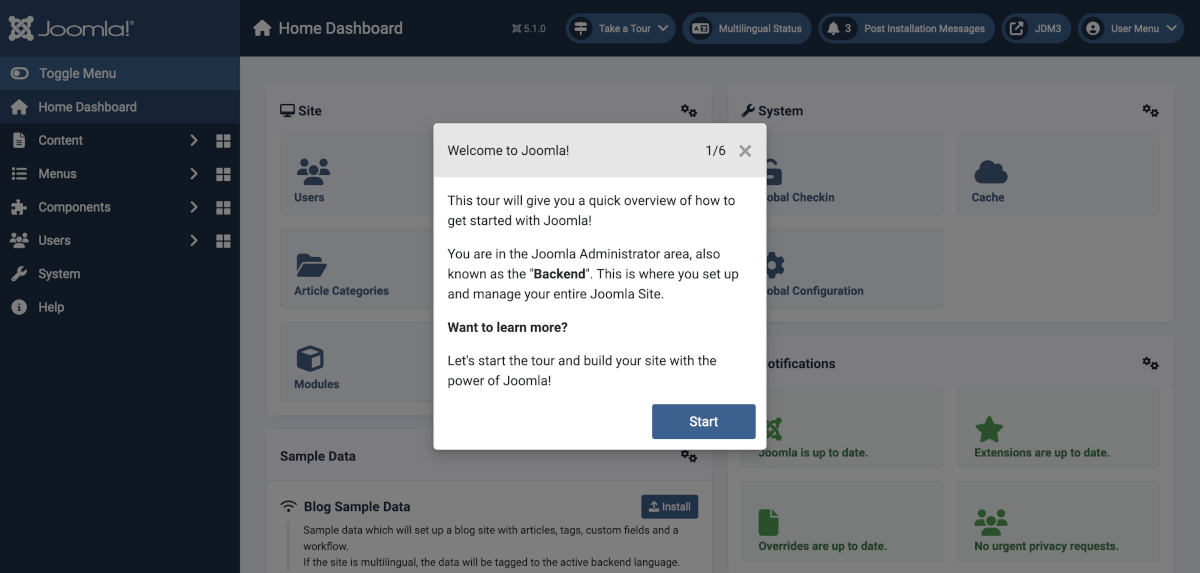
Guided Tours Welcome

List of Tours

The Tours are listed in a drop down menu in the Title bar of dashboard and list screens, as in the following illustration:
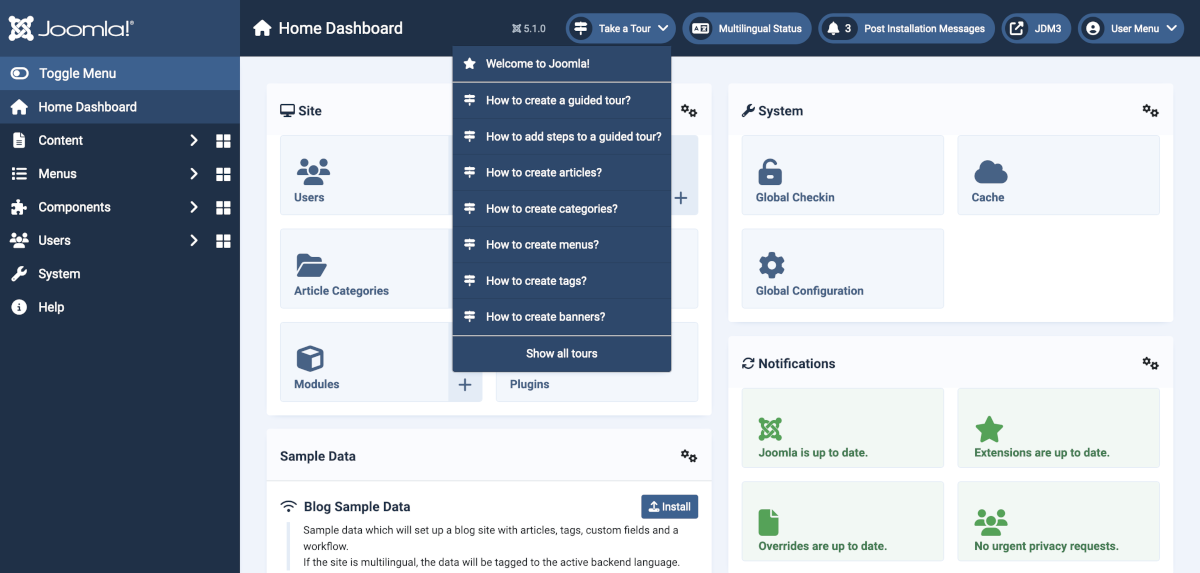
Guided Tours

The complete list includes the following:

  • Guided Tours
    • How to create a guided tour?
    • How to add steps to a guided tour?
  • Home Dashboard
    • Welcome to Joomla!
  • Articles
    • How to create articles?
  • Categories
    • How to create categories?
  • Menus
    • How to create menus?
  • Tags
    • How to create tags?
  • Banners
    • How to create banners?
  • Contacts
    • How to create contacts?
  • News Feeds
    • How to enter a news feed?
  • Smart Search
    • How to create smart search filters?
  • Users
    • How to create users?

More Tours may be added in the future. And you can create your own tours for your own components and/or customeres.

  1. You are here:  
  2. Home
  3. Documentation
  4. User Guides
  5. Content Management
  6. Help

  • Joomla! on Facebook
  • Joomla! on X
  • Joomla! on Bluesky
  • Joomla! on Threads
  • Joomla! on YouTube
  • Joomla! on LinkedIn
  • Joomla! on Pinterest
  • Joomla! on Instagram
  • Joomla! on GitHub
  • Home
  • About
  • Community
  • Forum
  • Extensions
  • Services
  • User Guide
  • Developer
  • Shop
  • Accessibility Statement
  • Privacy Policy
  • Cookie Policy
  • Sponsor Joomla! with $5
  • Help Translate
  • Report an Issue
  • Log in
 A Digital Public Good.

© 2005 - 2026 Open Source Matters, Inc. All Rights Reserved.

Rochen
Joomla! Hosting by Rochen
We have detected that you are using an ad blocker. The Joomla! Project relies on revenue from these advertisements so please consider disabling the ad blocker for this domain.