 User Documentation
 Joomla has two login areas, the site or frontend and the administrator area, or backend which is the area that controls all aspects of a Joomla website. Site owners and administrators use the backend to configure and maintain the website and its users. Other advanced users may use the backend to create and manage content, such as creating, editing, or approving articles. This tutorial describes how users log in to the backend administrator area.
Prerequisites
You must have an administrator account with a username and password to a Joomla site configured for default login (sites configured for advanced login options such as Single Sign-On or Passkeys are beyond the scope of this tutorial).
Steps
Login
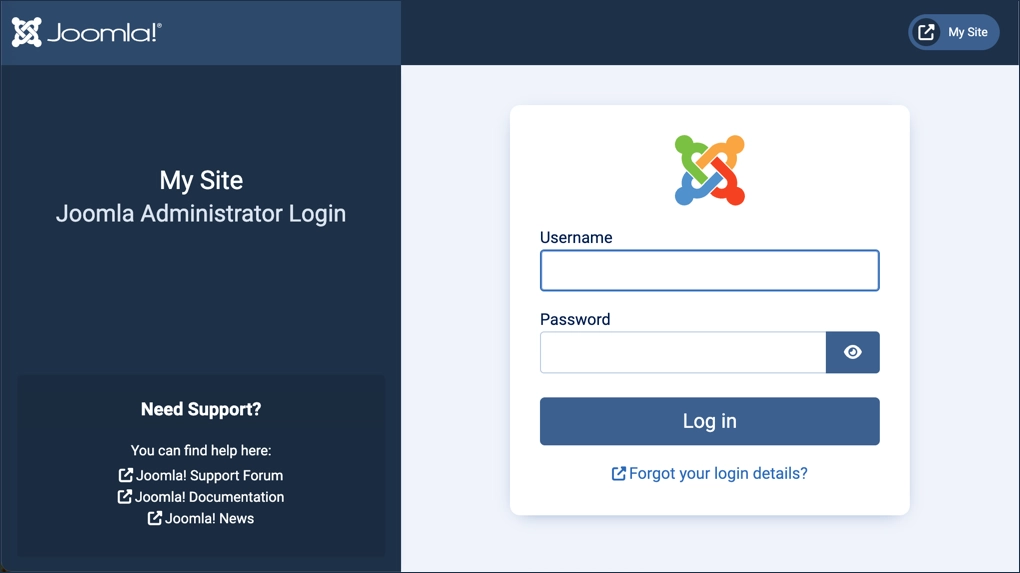
- Open a browser and navigate to the backend of your site by appending /administrator to your site’s URL. For example, if your site URL is https://www.mysite.com use https://www.mysite.com/administrator.
- Enter your username and password, then click Log In.
Explore the Layout
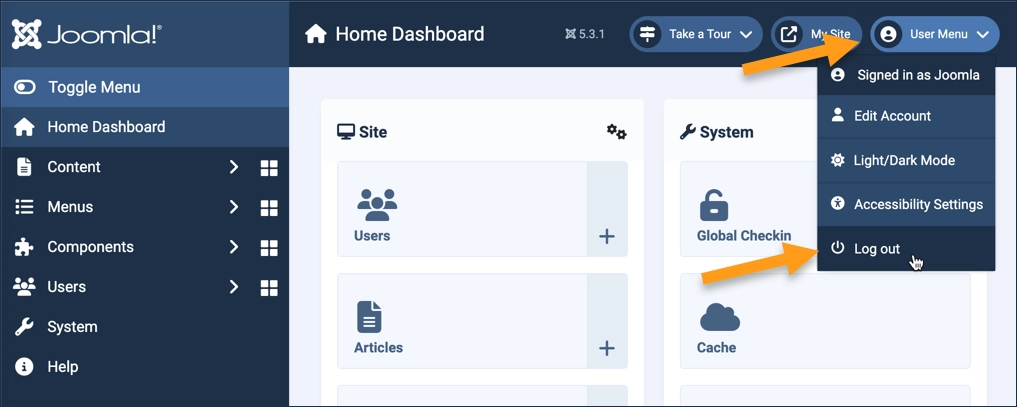
The main administrative menu appears on the left side of the screen.
Toggle Menu minimizes or expands the menu.
Most menu items are hierarchical, and clicking on them expands the submenu.
The main content area to the right of the administrative menu displays messages and commonly-used controls that change depending on which menu item is selected.
The header contains the Joomla version number, additional messages and information, a link to the site homepage, and the user menu.
Logout
- To log out, select Log Out from the User Menu in the header.
Concepts
- Joomla has two login areas, the frontend for site users, and the backend for administrators. This tutorial describes how administrators login to the backend.
- The frontend and backend are separate login areas.
- The backend administrative area is for site owners, administrators, and advanced users to configure and maintain the site, and to manage content, as will be presented in future tutorials.