 User Documentation
 Joomla's Task Scheduler can be started in three ways:
- Lazy Scheduler: by visits to your site.
- Web Cron: a cronjob that calls a link to your site.
- Command line: a cronjob on your site's own server that starts Joomla directly.
Use one of them at a time. The Lazy Scheduler and Web Cron are switched on and off in System > Scheduled Tasks > Options; the command line needs nothing switched on.
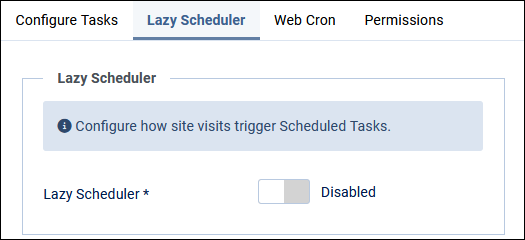

The Lazy Scheduler
Lazy scheduling relies on activity on your site: someone browsing pages in the frontend or working in the backend. While Joomla handles such a visit, it also runs the tasks that are due. That can make the site a little slower for that visitor.
The Lazy Scheduler does not guarantee that tasks run at their scheduled times: on a quiet site nothing runs. But it is on by default and needs no setup. If you have tasks that must run at precise times, for example with a Cron Expression, use Web Cron or the command line.
The Web Cron Scheduler
Web Cron needs a cronjob: in your hosting control panel, or at an external cron service. When you switch Web Cron on, Joomla creates a Webcron Link for you. The cronjob calls that link, and that starts the Task Scheduler. Usually the cronjob uses curl. This command runs the scheduler on mysite.com:
curl --request GET 'https://mysite.com/component/ajax/?plugin=RunSchedulerWebcron&group=system&format=json&hash=auto-generated-hash'
The screenshot below shows a typical cronjob setup in a hosting control panel (this is not part of the Joomla Administrator). Let the cronjob run every minute to give the Task Scheduler one-minute precision. You can run it less often: tasks then run less precisely on time, but your site does a little less work.

Once the cronjob is set up, switch the Lazy Scheduler off and Web Cron on. If both are on, both run tasks, and the Lazy Scheduler may still slow down visits now and then.
The command line: Web Cron without the link
If the cronjob runs on the same server as your site, it does not need the link. It can start Joomla's scheduler directly, with Joomla's own command line tool:
php /path/to/your/site/cli/joomla.php scheduler:run
This does the same as calling the Webcron Link: it runs the next task that is due. Add --all to run all due tasks in one go. How to set this up step by step is in Run Tasks from the Command Line.
Link or command?
Calling the Webcron Link
Advantages:
- It works from anywhere. The cronjob can run on another server or at an external cron service. That helps when your hosting has no cronjobs, or only cronjobs that call a URL.
- Tasks run like a page of your site: with the PHP version and the user of your website.
- No overlap. A task is not started while another task is still running.
Caveats:
- The link holds a secret key (the hash): anyone who has the link can start your tasks. Keep it private. If it gets out, use Reset Access Key in the Scheduled Tasks Options and update your cronjob.
- Time limits. The web server or the hosting may stop a request after a minute or two, which cuts long tasks short.
- Your site must be reachable for the cronjob, and every call is a visit that your site handles.
Running the command
Advantages:
- No time limits. A task runs as long as it needs: the best choice for long tasks.
- No secret, nothing open to the outside. Only someone who can run commands on the server can start it.
Caveats:
- It only works on the same server, and only if your hosting lets you run commands in a cronjob, not only call URLs.
- The PHP version. The command line may use another PHP version than your website. Give the full path to a PHP version your Joomla supports (PHP 8.3 or later for Joomla 6), for example
/usr/bin/php8.3; your host can tell you the path. - The user. The command runs as the user of the cronjob. If that is not the user of your website, files that a task writes may get the wrong owner.
- Overlap is possible. The command does not check whether a task is still running from an earlier cronjob. If a task can take longer than the interval of your cronjob, make sure that two runs at the same time do no harm, or run that task less often.