 User Documentation
 This glossary defines standardised terms and phrasing used across documentation and tutorials, to keep terminology and word choice consistent between authors.
Log in vs. Login
The rule: login (one word) is a noun or adjective; log in (two words) is the verb.
- Noun/adjective: "the login screen," "the login button," "your login credentials," "a failed login" — anywhere it's naming a thing or describing another noun, it's one word.
- Verb: "please log in," "log in with your email," "you need to log in first" — anywhere it's describing the action of logging in, it's two words.
Example: "Go to the login screen, then log in, then click the login button."
The same pattern applies to logout/log out: "the logout button" (noun/adjective, one word) vs. "log out when you're done" (verb, two words).
View the Site
Use "view the site" to direct a user working in the backend to open the frontend and check the results of changes they've just made.
The action uses the View Site link in the backend header, which opens the frontend in a new browser tab. This establishes a two-tab workflow: the backend in one tab, the frontend in another, with the user switching between them to check results. Introduce this pattern early — in the tutorial introduction — so users become comfortable switching tabs throughout subsequent tutorials.
Example: "In the backend header, click View Site to open the frontend in a new tab. Keep both tabs open and switch between them as you work through this tutorial."
Administrator Menu
The left-side navigation menu in the administrative area of the site is called the Administrator Menu.
Frontend / Backend
Use "frontend" to refer to the public-facing website, and "backend" to refer to the administrative area. These correspond to what Joomla's own documentation calls "the Site" and "the Administrator," respectively.
Prefer frontend/backend in tutorial instructions, especially when directing a reader to log in to one or the other — it reads more naturally as a contrastive pair. Use Site/Administrator only when referencing Joomla's own official settings or menu labels, where those exact terms appear (e.g., Site Modules vs. Administrator Modules).
Drag Handle
Use "drag handle" for the icon (three vertical dots) that appears in backend list views for reordering items — articles, menu items, modules, categories, and similar lists all support this. It appears after clicking the up/down arrow icon in the relevant column heading, and only when the list is filtered or sorted such that ordering is possible.
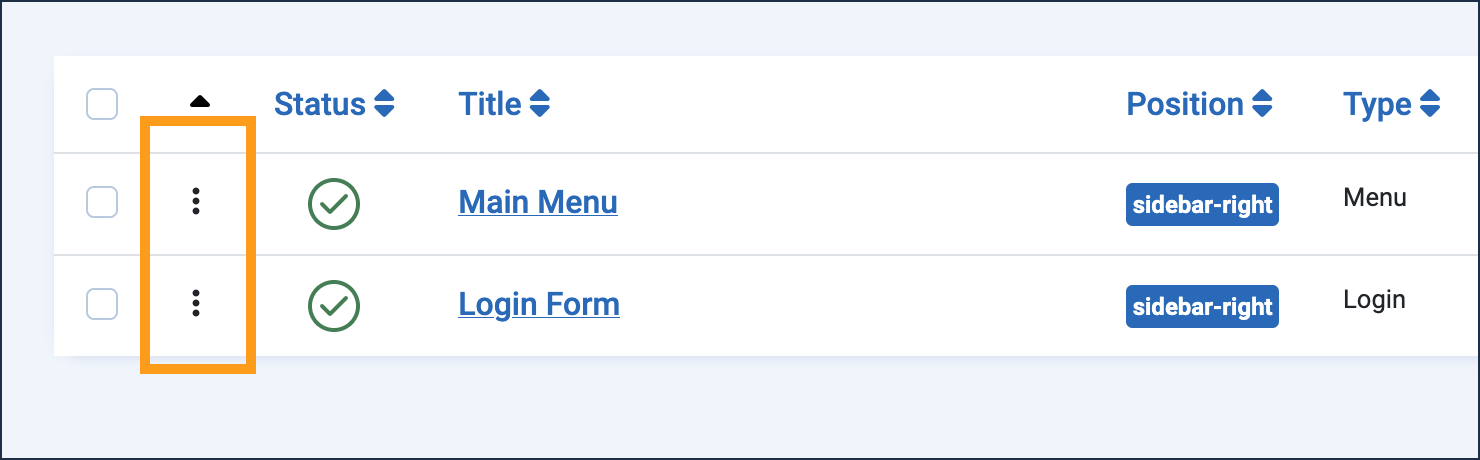
Joomla's own codebase refers to this internally as the "sortable handler" (CSS class sortable-handler, icon icon-menu), but "drag handle" is the term used in Joomla community documentation and forums, and is the more recognisable term for readers.
Example: "Click the drag handle next to Sidebar Announcement and drag it to the top of the list."